Kubernetes Rollout

Kubernetes rollout means updating any deployment. In Kubernetes, this is done with rolling updates. Rolling updates allow Deployments’ update to take place with zero downtime by incrementally updating Pods instances with new ones. The new Pods will be scheduled on Nodes with available resources.
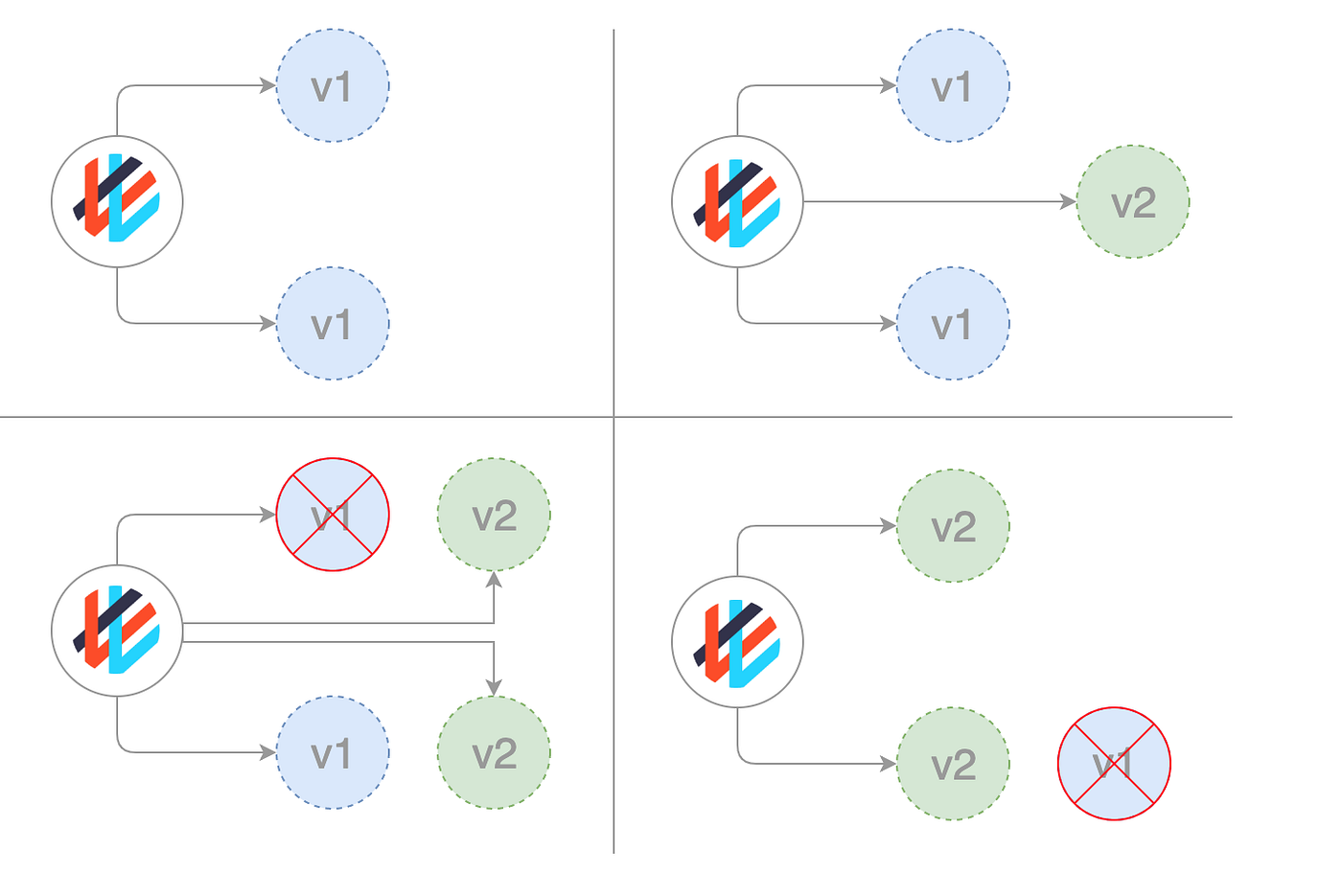
First, it creates an updated pod and it deletes the old one. It will maintain the balance of the desired pods in a way that 75% of pods should be up. For creating new pods before deletion the allowed surge percentage is 125%.
NOTE: For scalling updation, rollout won't happen
you can update a previously created deployment using this command
kubectl set image deployment/nginx-deployment nginx=nginx:1.16.1 --recordthe output will be
deployment.apps/nginx-deployment image updatedTo see the rollout status:
kubectl rollout status deployment/nginx-deploymentthe output will be:
deployment "nginx-deployment" successfully rolled outRollover-updating parallelly while deploying
It is the process where the deployment is updated even before the completion of the deployment.
Here, suppose you create a Deployment to create 5 replicas of nginx:1.14.2, but then update the Deployment to create 5 replicas of nginx:1.16.1 , when only 3 replicas of nginx:1.14.2 had been created. In that case, the Deployment immediately starts killing the 3 nginx:1.14.2 Pods that it had created, and starts creating nginx:1.16.1 Pods. It does not wait for the 5 replicas nginx:1.14.2 to be created before changing course
Rolling Back
If rollout stuck due to some error in the updation we have to go for the rollback option.
Suppose that you made a typo while updating the Deployment, by putting the image name as nginx:1.161 instead of nginx:1.16.1Then it will show you an error.
you will get the status of the pod such as ImagePullBackOff
Checking Rollout History of a Deployment
First, check the revisions of this Deployment:
kubectl rollout history deployment.v1.apps/nginx-deploymentTo see the details of each revision, run:
kubectl rollout history deployment.v1.apps/nginx-deployment --revision=2Rolling Back to a Previous Revision
Follow the steps given below to roll back the Deployment from the current version to the previous version, which is version 2.
1.Now you’ve decided to undo the current rollout and rollback to the previous revision:
kubectl rollout undo deployment.v1.apps/nginx-deployment
The output is similar to this:
deployment.apps/nginx-deployment rolled back
2.Alternatively, you can rollback to a specific revision by specifying it with --to-revision:
kubectl rollout undo deployment.v1.apps/nginx-deployment --to-revision=2
The output is similar to this:
deployment.apps/nginx-deployment rolled back